Can you put photos on a spinning wheel? Your Image Wheel questions, answered
Where do the pictures go? How many can I add? Will it work on my phone? The questions people ask most about the Image Wheel Spinner, answered straight.
walter2930 4 min read

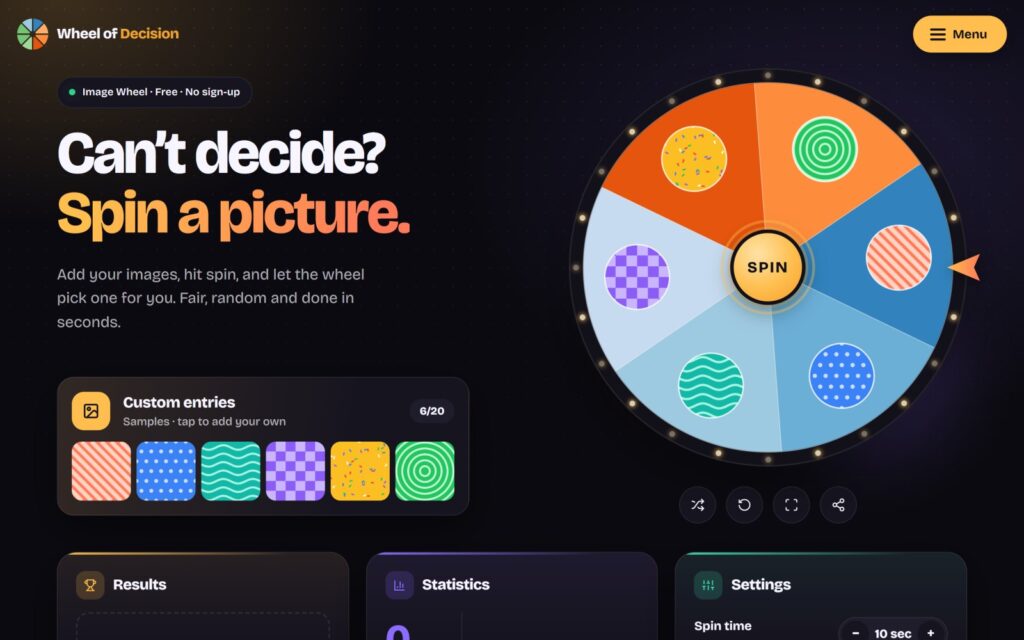
The Image Wheel Spinner raises the same handful of questions for almost everyone who tries it. So instead of a tour, here are the answers, in the order you’re likely to wonder about them.
So what is it, exactly?
A spinning wheel where every slice is a picture instead of a word. Add your images, press SPIN, and the winning picture pops up with its name. It’s the same wheel as the homepage, the same speed-up and slow-down, the same fair pick, just visual.
Where do my pictures go when I add them?
Nowhere. This is the answer I’m proudest of. Your pictures are processed inside your browser and saved there, on your own device. They are not uploaded to the site, and I never see them.
That matters most for photos of people. A teacher can put the whole class on a wheel without those faces ending up on someone else’s server.
The one exception: if you import pictures from a Google Sheet (more on that below), the site’s server fetches them from your links for you. It doesn’t keep them.
How many pictures can I add, and what kind?
Up to 20 pictures per wheel, each up to 5 MB, in JPG, PNG, GIF or WebP. Drag them onto the upload area or click Browse files.
Why only 20?
Because past 20, each slice is so thin you can’t tell what the picture is, and a picture wheel you can’t read is worse than a list of names. If you need more entries than that, use names on the main Spinner Wheel, which takes as many as you like.
Can I give each picture a name?
Yes, and it’s worth doing. The name shows in the winner pop-up and in your results, so “Mia” beats “IMG_4471.jpg”.
Does it work on my phone?
Yes. On a phone you can add pictures from your camera roll, and the wheel fits the screen.
Will my wheel still be there tomorrow?
Yes. Pictures, names and settings are saved in your browser, so the wheel comes back exactly as you left it. Two catches, both caused by keeping things on your device: the wheel won’t appear on a different device, and clearing your browser data clears the wheel. Keep your original photos somewhere safe.
My photos are already online. Do I have to download them all?
No. Put the picture links in one column of a Google Sheet and the names in another, share the sheet as “Anyone with the link”, and paste the link into Import from Google Drive. Choose the two columns and the wheel fills itself. A row with a name but no picture gets a slice with that person’s initials, so a half-finished list still works.
Can a picture win more than once?
Only if you want it to. Turn on Remove winner and each winning picture leaves the wheel after it’s picked. That’s the setting for giveaways with several prizes.
Is it really random? Big pictures don’t win more often?
It’s really random. The pick comes from your browser’s cryptographically secure random number generator, and every slice has exactly the same chance no matter what’s in the picture.
What else can I change?
- Spin time, anywhere from 7 seconds to 2 minutes.
- Sound on or off.
- Shuffle to mix up the order of the slices.
- Hover over a picture in the preview grid to remove it, or clear them all.
What do people actually use it for?
The uses it was built for: photo contests (spinning for a prize among the shortlisted entries), product giveaways where you want viewers to see the prizes, picking which restaurant from photos of the food, movie night with posters instead of titles, choosing an outfit, and classrooms with younger children, who recognise faces long before they can read names.
Anything it can’t do?
It can’t sync between devices, it stops at 20 pictures, and it doesn’t do video. If any of those matter, it’s the wrong tool, and I’d rather tell you now.
Got a question that isn’t here? Send it to me and it’ll probably end up in the next version of this page. Or just try the Image Wheel; it takes about thirty seconds.